Setting Up Your Phone for US Grad School: Getting a US Number with Mint Mobile
Setting Up Your Phone for US Grad School: Getting a US Number with Mint Mobile
One of the first things you need after landing in the US is a US phone number.
Opening a bank account, dealing with your apartment, logging into school systems, using apps like Uber or DoorDash — all of it is a lot easier once you have a US number.
Thinking about this as a UTSW PhD student, here’s what I think is the most realistic way to handle your phone setup early on.
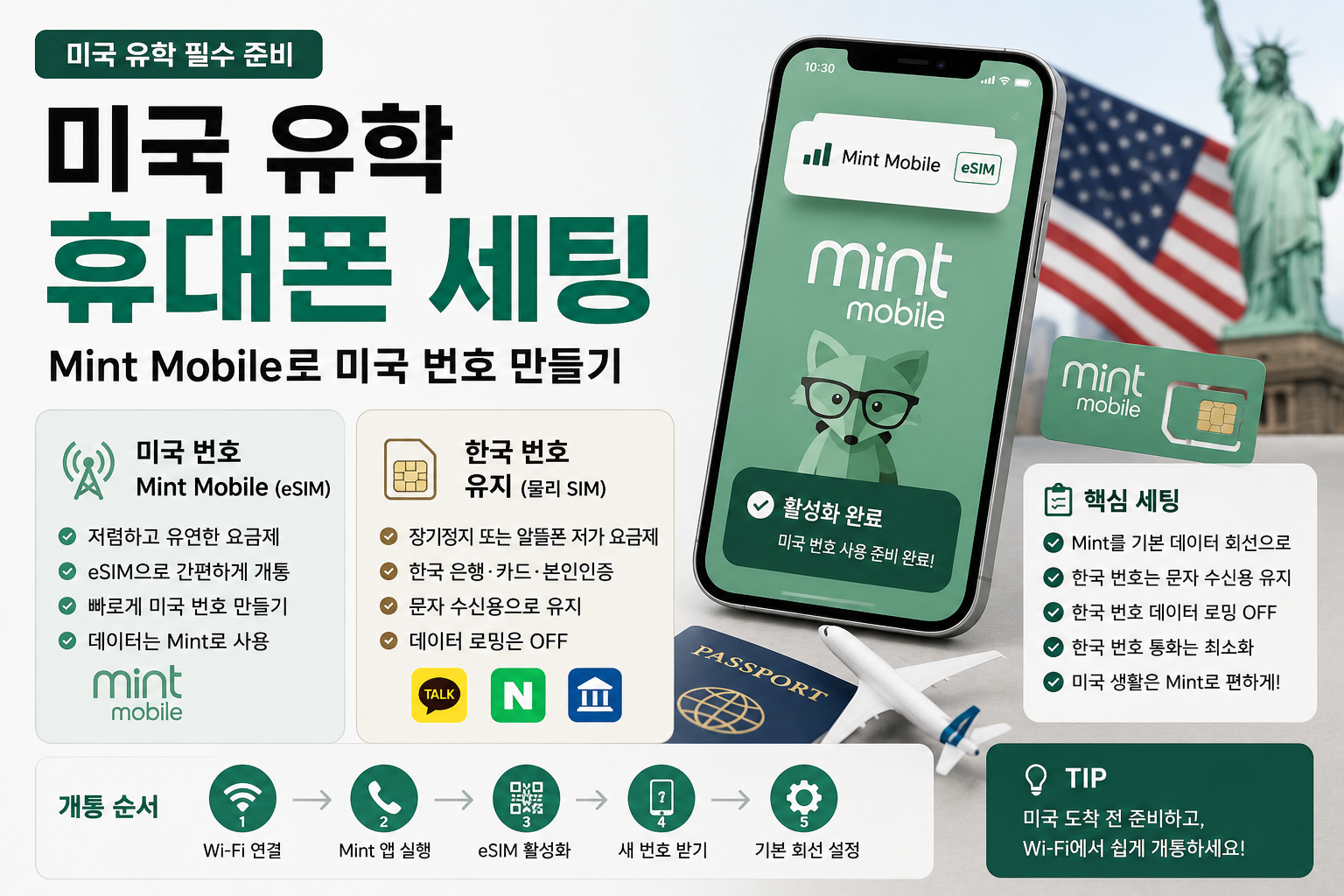
Get a US number through a Mint Mobile eSIM, and keep your Korean number alive just for receiving verification texts.
The short version
Here’s the setup I’d recommend.
| Category | Recommended setup | Purpose |
|---|---|---|
| US number | Mint Mobile eSIM | Main number for life in the US |
| Korean number | Long-term suspension on your existing carrier, or a cheap MVNO plan | Receiving Korean bank/card/verification texts |
| Data | Mint Mobile | Main data line in the US |
| Data roaming on Korean number | Off | Avoid unwanted roaming charges |
| Calls on Korean number | Barely use it | Replace with KakaoTalk voice, FaceTime, etc. |
The core idea: use Mint Mobile as your main line in the US, and don’t cancel your Korean number — just keep it alive for verification.
1. Why Mint Mobile
Mint Mobile is one of the low-cost carriers in the US.
It’s not the kind of carrier with a store on every corner like the big ones — it’s closer to signing up online and getting an eSIM or physical SIM.
For grad students, the appeal of Mint Mobile is pretty simple.
- You can activate it as an eSIM
- No need to visit a store to get started
- Low commitment, no heavy contract
- You can get a US number quickly
- The pricing structure is relatively simple
- Works well as a second line alongside your Korean number (dual SIM)
For a PhD student who just landed in the US, what matters more than finding “the perfect carrier” is having a US number you can activate fast enough to use for the bank, school, and apartment.
2. Can you set up a Mint Mobile US number before leaving Korea?
To be precise: you can prep everything in Korea, but it’s safer to fully activate it after you land in the US.
Mint Mobile installs and activates as an eSIM through the app or a QR code.
When you get a new number, it’s usually assigned based on a ZIP code.
So the safest approach looks like this:
To do while still in Korea
To do after landing in the US
In other words, don’t try to force every activation step through while still in Korea. It’s better to just prep in Korea, then activate calmly over Wi-Fi once you land.
3. Why an eSIM makes life easier
The most convenient combination for grad students is usually this:
Mint Mobile = eSIM
Korean number = physical USIM
That way, you can keep both your US number and Korean number active on a single phone.
In the US, Mint Mobile stays your main line, and you only turn on your Korean number when you need to receive verification texts from Korean banks, cards, KakaoTalk, or Naver.
Why eSIM works well
- Easy to activate right after landing in the US
- Little to no waiting around for a physical SIM to arrive
- You can keep your Korean physical SIM exactly as it is
- Easy to manage a US number and a Korean number side by side
- Relatively painless if you ever want to switch numbers or plans
That said, eSIM only works if your phone supports it and is unlocked (no carrier lock).
4. You’ll need data the moment you land
Landing at a US airport with no data is more inconvenient than you’d expect.
On arrival day, you’ll need internet immediately for things like:
- Checking Google Maps
- Calling an Uber or Lyft
- Contacting whoever’s handling your housing
- Checking your school email
- Letting your family know you’ve landed
- Activating your Mint Mobile eSIM
- Checking your apartment’s check-in instructions
So before you leave, it’s worth settling on exactly how you’ll get online on arrival day.
Option 1. Turn on Korean carrier roaming for just a day
This is the safest option, since your internet never drops after landing.
The tradeoff is that it can cost you something.
Option 2. Activate the Mint Mobile eSIM over airport Wi-Fi
This saves money, but if the airport Wi-Fi is flaky or activation goes sideways, it can be a little stressful.
Personally, for a first arrival, I think the least stressful approach is to have a day of Korean roaming ready as a backup, then calmly activate Mint Mobile once you’re settled at your place.
5. The order of operations for activating Mint Mobile
Here’s roughly how activating Mint Mobile after arrival goes.
Step 1. Connect to Wi-Fi
Connect to whatever’s available — airport, housing, or school Wi-Fi.
Step 2. Open the Mint Mobile app
It helps to have already installed the app back in Korea.
Step 3. Activate the eSIM
Activate the eSIM from within the Mint Mobile app.
Just follow your order confirmation email or the in-app instructions.
Step 4. Get a new number
If you don’t already have a US number, you’ll be issued a new one.
Entering a Dallas (or your local) ZIP code gets you a number tied to that area.
Step 5. Set your default line
Set Mint Mobile as your default line for daily life in the US.
On an iPhone, it roughly looks like this:
- Cellular Data: Mint Mobile
- Default Voice Line: Mint Mobile
- Korean number: Keep it on
- Korean number Data Roaming: Off
- Allow Cellular Data Switching: Off
With this setup, you use Mint Mobile data exclusively in the US, while your Korean number stays around purely to receive verification texts.
6. How should you pick a Mint Mobile plan?
Instead of paying for a full year upfront, I’d recommend trying it out for the first 3 months or so before committing.
Mint Mobile is typically structured as prepaid, billed in a few-month blocks.
Since pricing and data allowances can change, double-check the official site right before you sign up.
If you’re a light data user
If you mainly rely on Wi-Fi at school and home, and only use maps or messaging apps when you’re out, you can start with a low-data plan.
If you’re a heavy data user
If you’re frequently streaming video, using your hotspot, grocery apps, maps, or Uber while out, a mid-tier or higher data plan will feel more comfortable.
If it’s your first time and you’re not sure
Don’t go too low for your first 3 months — starting with a mid-tier plan is the safer, more comfortable choice.
Once you’ve settled into Dallas and have a real sense of your data usage, you can scale up or down from there.
7. Why you should keep your Korean number alive
Just because you’ve got a US number doesn’t mean you should cancel your Korean number right away.
You’ll need your Korean number for longer than you’d expect.
Situations where you’ll still need your Korean number
- Logging into Korean banking apps
- Identity verification in card apps
- Keeping your KakaoTalk account active
- Naver verification
- Gov24 (정부24) verification
- Anything involving your public/financial certificate (공동인증서·금융인증서)
- Korean insurance, family, or school-related contact
- Confirmation texts for overseas card charges
Especially in your first weeks in the US, you’ll be checking Korean banking and card apps fairly often.
Without your Korean number, you can get stuck at the identity verification step.
So it’s safer to keep your Korean number alive for at least a few months — ideally around a year.
8. Keeping your Korean number, option 1: long-term suspension with your existing carrier
The most stable approach is your existing carrier’s long-term suspension + overseas text-receiving/verification service.
This isn’t a setup for receiving phone calls on your Korean number.
It’s a setup for keeping your Korean number alive purely to receive verification texts.
Pros
- Relatively simple to set up
- Well-suited to grad students and long-term expats
- Keeps your Korean number
- You can still receive verification texts
- Costs roughly 5,000–6,000 KRW a month to maintain
Cons
- Hard to receive phone calls on your Korean number
- Sending texts may be restricted
- No data usage
- PASS app or ARS phone verification may be restricted
Good fit for
- Anyone whose departure date is coming up soon
- Anyone who doesn’t want the stress of dealing with their Korean number
- Anyone who just needs verification texts to come through reliably
- Anyone who rarely expects to receive calls on their Korean number
Most grad students replace calls with family and friends using KakaoTalk voice calls, FaceTime, Zoom, and the like.
9. Keeping your Korean number, option 2: a cheap MVNO plan
The second option is porting your Korean number over to a cheap postpaid MVNO (알뜰폰) plan.
This approach can save you money in the long run.
But you absolutely need to test it before you leave Korea.
Things to check before switching to an MVNO
Reliability for receiving verification texts from abroad can vary quite a bit between MVNO providers.
So if you go the MVNO route, make sure to test verification texts in Korea before you leave.
10. Can you still receive calls on your Korean number?
Technically yes, but I generally wouldn’t recommend it.
If your Korean number is on long-term suspension plus a text-receiving service, you should basically assume you can’t take calls on it.
On the other hand, if you keep an MVNO or your existing carrier plan active (not suspended), you can receive calls — but taking a call on your Korean number while in the US can trigger roaming voice charges.
So most PhD students end up doing this:
Don’t answer calls to the Korean number.
Take anything urgent over KakaoTalk.
Keep the Korean number alive purely for text verification.
It’s worth telling family and friends something like this before you leave:
Once I’m in the US, I probably won’t be able to pick up calls to my Korean number.
If it’s urgent, please reach me on KakaoTalk or email.
11. The setup I’d personally recommend
If I were heading to the US as a UTSW PhD student, here’s what I’d do.
US number
Use a Mint Mobile eSIM
- Install the app while still in Korea
- Confirm your phone supports eSIM
- Activate over Wi-Fi after landing in the US
- Get a new number using a Dallas ZIP code
- Use it as your main number for life in the US
Korean number
If stability matters most: long-term suspension with your existing carrier + text-receiving service
- Roughly 5,000–6,000 KRW a month
- Purely for receiving verification texts
- Mostly give up on receiving Korean calls
- The least stressful option in your first weeks abroad
If saving money matters most: a cheap postpaid plan from a major MVNO
- Port your number 2–3 weeks before leaving
- Keep the physical USIM
- Confirm whether international SMS can be received
- Test verification with your bank, card, Naver, and Kakao apps
- Check the price once the promotional discount ends
Personally, I think it’s fine to prioritize stability for the first 6 months to a year after arrival, then decide later whether to switch to an MVNO once life in the US has settled down.
12. Pre-departure checklist
Mint Mobile prep
Korean number prep
The short version
Once you land in the US, a US number is more or less essential.
If you’re headed to a long stay like a UTSW PhD program, the most realistic setup is getting a US number through a Mint Mobile eSIM, while keeping your Korean number alive purely to receive verification texts.
Rather than starting out by comparing a bunch of carriers, it’s better to keep it simple:
- US number: Mint Mobile eSIM
- Korean number: keep it on the physical USIM
- US data: use Mint
- Data roaming on the Korean number: off
- Calls on the Korean number: barely take them
- Korean verification texts: keep them coming through
In the end, the goal is simple.
Live on your US number while you’re in the US, and keep your Korean number safely alive just for verification.
Get this setup in place, and getting started with banking, school, your apartment, transportation, and grocery apps right after landing gets a lot easier.